mercurial bookmarks February 27, 2009
When reading the many git-vs-mercurial blog posts I noticed lots of comments about how mercurial lacked the lightweight branching of git. Then came a lot of rebuttals saying “well hg has bookmarks, so that’s not true anymore”. But when I tried them, I was surprised by their behaviour. If you had two bookmarks pointing to the same changeset, they both would move as you create new child changesets. But with the 1.2 release of hg coming out soon, an updated version of the bookmarks extension will be included. It has a configuration option (which I wish was the default but cannot be due to backwards compatibility) called track.current. To enable this behaviour, you’ll need this in your rc file:
[extensions]
hgext.bookmarks =

[bookmarks]
track.current = True
Here’s a workflow that I find useful. You might start off your day by looking at issues in your project tracker and creating a todo list of what issues you want to tackle. Instead of writing them on a post-it, let’s use bookmarks:
$ hg bookmark issue11
$ hg bookmark issue12
$ hg bookmarks
   issue11                   216:ca8cec4bf890
   issue12                   216:ca8cec4bf890
You’ll notice none of them appear active even though they point to the current changeset which matches our
working copy.
$ hg up issue11
0 files updated, 0 files merged, 0 files removed, 0 files unresolved
$ hg bookmarks
 * issue11                   216:ca8cec4bf890
   issue12                   216:ca8cec4bf890
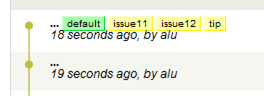
Let’s start hacking on issue11,
*hack* *hack*
$ hg ci -m"fixing issue11"
*hack* *hack*
$ hg ci -m"still fixing 11"
$ hg bookmarks
 * issue11                   218:cdc9e873455d
   issue12                   216:ca8cec4bf890
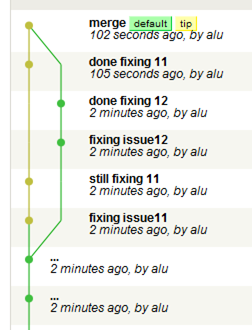
At this point, we haven’t yet created a branch:
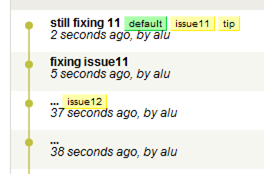
Our work on issue11 is still not finished, but we’re bored with and want to work on something else for a while. So let’s do some work on issue12:
$ hg up -C issue12
1 files updated, 0 files merged, 0 files removed, 0 files unresolved
*hack* *hack*
$ hg ci -m"fixing issue12"
created new head
*hack* *hack*
$ hg ci -m"done fixing 12"
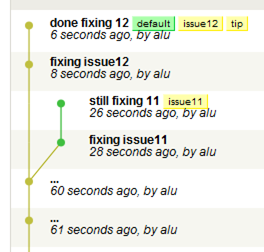
Now we we’re happy with our fix and are done with 12. Back to issue 11.
$ hg up -C issue11
0 files updated, 0 files merged, 0 files removed, 0 files unresolved
*hack* *hack*
$ hg ci -m"done fixing 11"
Merge in changes from issue12, (could have done this earlier):
$ hg merge issue12
merging file
0 files updated, 1 files merged, 0 files removed, 0 files unresolved
(branch merge, don't forget to commit)
$ hg ci -m"merge"
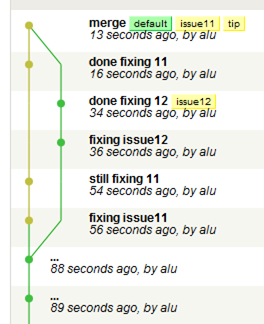
We’re done with these bookmarks for now so delete them:
$ hg bookmark -d issue12
$ hg bookmark -d issue11
Thanks for this! I’ll try to remember this useful tip. 🙂
[…] is a similar workflow to my other post about bookmarks, except it allows me to safely push changes to one task while keeping my incomplete task […]
What I still don’t understand, and haven’t seen mentioned anywhere, is:
a) what happens if you do an `hg push` while there are bookmarks with commits in them? Do ALL of those commits get pushed even if you are in a separate bookmark?
b) How do move out of all bookmarks back into the main branch? (As in you first example where none of the bookmarks are active)
I think some of my confusion comes from my familiarity with git branches…
If the release notes can be believed, then [bookmarks] track.current = True is the default in Mercurial 1.8.4 now.